UCmod STOP SPAM
Smart moderation for Telegram groups

An anti-spam bot for Telegram groups and chats that does not ban your members

The bot automatically removes crypto scams, fake easy-money offers and attempts to move people into private messages. It leaves genuine classified posts, sales and vacancies alone. Free for every group and chat.

70+
Active protected groups
12 000+
Detected spam accounts
19 000+
Processed detections
🛡
STOP SPAM Bot
Decision card for an administrator
👀 Suspected spam Score: 85
🚨 Suspicious message:
👤 From: Mark (@crypto_trader)
💬 Text: “Ready to buy U.S.D.T on TRC20 for cash euros at a high rate. Message me privately.”

🔍 Detection reasons:
• Crypto token (obfuscated USDT)
• Transaction intent (buying/exchange)
• Redirect to private messages
✅ The decision was applied and recorded in the log.

Does this look familiar in a classified group?

Basic anti-spam bots force administrators into a bad choice

Crude word filters

They ban on a single word such as “USDT” or “job”. Genuine members, parents posting notices, local businesses and job seekers get caught with the spam.

Exhausting manual moderation

An administrator has to watch the chat around the clock and manually remove waves of crypto-buying offers, drug drops and easy-money scams.

🕵️‍♂️

Evasive spammers

They replace letters (`u,s.dt`, `юSдT`), insert invisible characters, space out words and use misleading profile links to bypass simple word filters.

How to add an anti-spam bot to a Telegram group

Three steps in under a minute, then the bot protects the chat

01

Add the bot as an administrator

Allow it to delete messages and restrict members. Setup takes less than a minute.

02

The bot analyses the message stream

Every message is checked against 56 detector signal types and false-positive safeguards.

03

Spam is removed

Clear scams are removed immediately. Uncertain cases are sent to an administrator as a decision card in a private chat.

What the anti-spam bot removes from a Telegram chat

Eight types of abuse commonly seen in classified groups

💎

Crypto scams

USDT/TRC20 buying and exchange offers, cash deals, exchange services, rates and obfuscated variants such as `u,s.dt`.

💸

“Easy money”

Daily-pay offers, no-experience jobs, microtasks, recruitment into a “team” and relocation-for-work scams.

🤿

Filter evasion

Homoglyphs, invisible Unicode characters, spaced-out letters and misleading @usernames.

📢

Promotions and private-message redirects

Lead collection, redirects to private messages, adult services, esoteric offers, mass mailings and promotional series.

🎭

Emoji flooding

Emoji-heavy walls of text (>60% of characters), non-text flooding and duplicate messages.

Spam networks

The same text sent to 5+ groups within 15 minutes triggers immediate automatic cleanup of the copies.

🚫

Prohibited content

Drug sales, dead drops and CSAM offers receive the highest priority and an immediate permanent mute.

🤖

Third-party bots

Removes bots invited by ordinary members and blocks their messages. Bots added by administrators remain trusted.

Careful protection

Why does the bot avoid banning genuine members?

The core strength of STOP SPAM is its false-positive safeguards. The bot can distinguish a genuine classified post from a scam pattern.

  • A service price list that mentions USDT: If a car-rental company states “Payment: EUR, USD, USDT” - the bot recognises the service context and does not delete the post.
  • Local businesses and job seekers: A phone number, professional qualifications or a personal request such as “I am looking for nanny work” are treated as signs of a genuine post.
  • Safer routing: When confidence is lower, the bot does not punish silently. It routes the case to an administrator’s decision card.
🚗
Car rental in Alicante
Chat message
Alex (@alex_rent):
Car available to rent for three days or more. Automatic transmission, insurance included. Pay by cash, card or USDT (from €25/day). Tel: +34 611 223 344
🟢
Detector verdict: ALLOW
A safeguard matched: service context (car rental) + contact details + a price per period.

Simple button-based controls

No complicated commands. Every setting is changed with clear ✅ / ☑️ toggles.
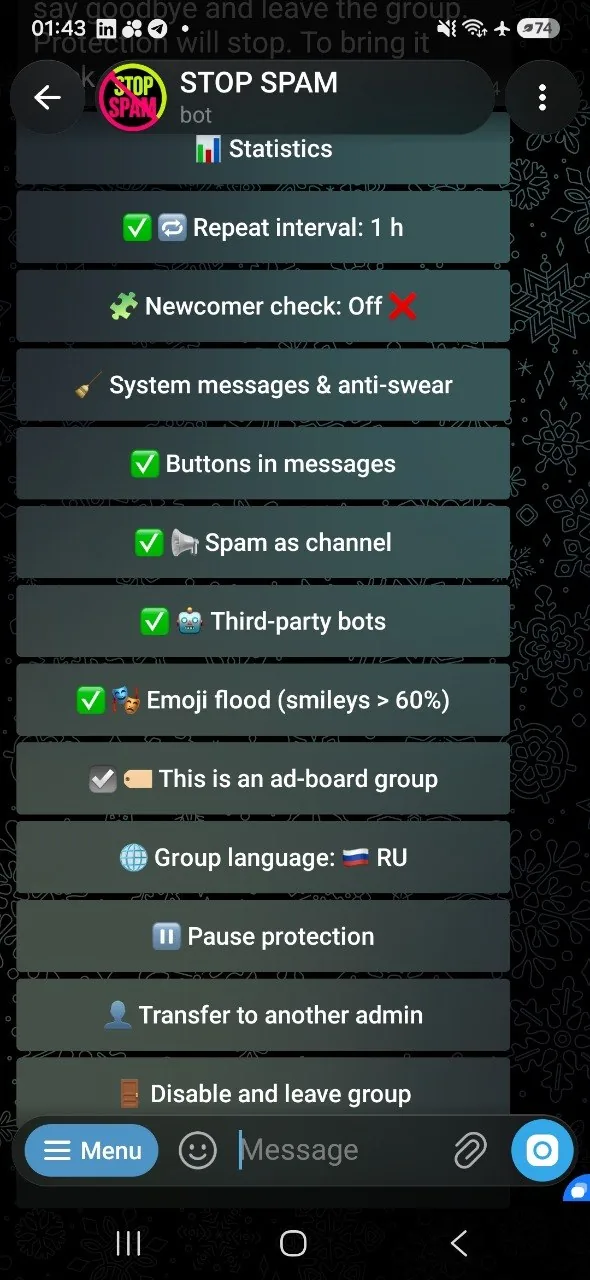
STOP SPAM settings for one Telegram group: protection mode, action threshold, link and image filters
Settings for one groupMode, notices, filters and thresholds are controlled with buttons
STOP SPAM’s main menu with controls for connected Telegram groups
Main moderation menuOpen the required group or apply supported rules across your managed chats
Stronger together

Protection at entry and inside the chat: STOP SPAM + @UCPRbot

Both bots work independently. Together they share recent moderation outcomes and avoid filling the chat with conflicting service messages.

Step 1: At entry

Bot @UCPRbot

Checks subscription requirements and compares an incoming member against STOP SPAM’s list of 12 000+ detected spam accounts. If the account is listed, it is muted before its first message.

Step 2: Inside the chat

STOP SPAM bot

Continuously analyses chat messages. After confirmed spam removal, STOP SPAM updates its data and tells UC PR Bot that this person’s access-requirement card is no longer needed.

What members see:

Instead of a STOP SPAM scam notice followed by a “subscribe and invite a friend” prompt, the chat keeps one clear moderation outcome. The integration is optional: if either bot is unavailable or not installed, the other continues its core work.

Where the combination is especially useful:

🔒
Subscription-gated groups: A member passes @UCPRbot’s access check while STOP SPAM protects the private chat.
🚀
Large membership campaigns: Known spammers can be filtered before they enter during a large influx of members.
🌐
A network of chats under one owner: A spammer caught in one chat is recognised when trying to enter other chats in the network.

Transparent decisions and a right to appeal

A member can challenge a mistake instead of remaining blocked without recourse

📩

The “Appeal” button

A notice under each removed message includes an appeal button. The request is sent to a chat administrator.

🔄

Three correction scopes

“Not spam” trusts the author only in the current group. “Immunity” applies across the administrator’s managed groups. “Lift restrictions” removes mute/ban and the rating without adding an allowlist entry. Telegram cannot restore a deleted post.

📜

Private moderation log

Connect a private log channel where the bot records moderation actions and outcomes for audit.

Interface in four languages

Each administrator can use the bot in their preferred language

🇷🇺 Russian
🇬🇧 English
🇺🇦 Ukrainian
🇺🇿 Uzbek

The bot is completely free

All moderation features, spam-account checks, safeguards, appeals and log channels are available with no feature limits or hidden charges.

Frequently asked questions

Answers for Telegram group administrators and owners

Do not judge a bot by the length of its stop-word list. A crude filter for “buy” or “USDT” can remove genuine classified posts with the spam. STOP SPAM combines independent signals such as a crypto term, transaction intent and a private-message redirect, then applies safeguards when a message looks like a real offer with a phone number, city, price or photo gallery. Uncertain cases go to an administrator’s decision card. The bot is free and supports Russian, English, Ukrainian and Uzbek.

Open @stopusdt_bot, tap “Add to group” and select your chat. In the group settings, allow the bot to delete messages and restrict members. It starts working immediately; mode and strictness are changed with buttons in its menu. Supported settings can also be applied across your managed groups.

The detector uses multiple false-positive safeguards. Signs of a real service, contact details or a price can reduce suspicion. When confidence is insufficient, the case is sent to an administrator for review instead of being silently punished.

The member can tap “Appeal” and the request goes to an administrator. “Not spam” lifts restrictions, resets the rating and allowlists the author only in the current group. “Immunity” applies trust across the administrator’s managed groups. “Lift restrictions” removes mute/ban and the rating without allowlisting. Telegram does not let a bot restore a deleted message.

The bot requests permission to delete messages and restrict members. Without those permissions it can only send suspicion cards privately to an administrator.

When “Third-party bots” protection is enabled:

  • An administrator added the bot. It is trusted in that group immediately, even without administrator status. Its first welcome message is not removed.
  • The bot was already an administrator. STOP SPAM leaves it alone.
  • An ordinary member added the bot. The bot is removed and its messages are blocked.
  • A legitimate non-admin bot was already in the group. Add it to the group allowlist manually because Telegram does not provide historical information about who invited it.

STOP SPAM needs permission to delete messages and restrict members. If Telegram temporarily prevents verification of the inviter’s status, the bot does not punish anyone without confirmation.

No. The bot works only in groups where administrators added it and in each administrator’s private management chat with the bot.

The bot does not keep complete chat histories. It stores the limited technical records needed for moderation, including hashes of spam texts, identifiers of moderated messages, outcomes and group settings, under the project’s retention rules.

Yes. Supported settings can be applied across your managed groups. A confirmed spammer caught in one group can also be recognised by the protection in the other groups you manage.

Both bots work independently. @UCPRbot manages access requirements and checks known databases, while STOP SPAM analyses messages. When both are installed, UC PR Bot quietly removes an obsolete access card after confirmed spam removal, leaving one clear notice instead of conflicting service messages.

The bot is completely free for Telegram chats and communities.

What the anti-spam bot looks like inside Telegram

Current English bot screens. Open a screenshot to view it at full size.

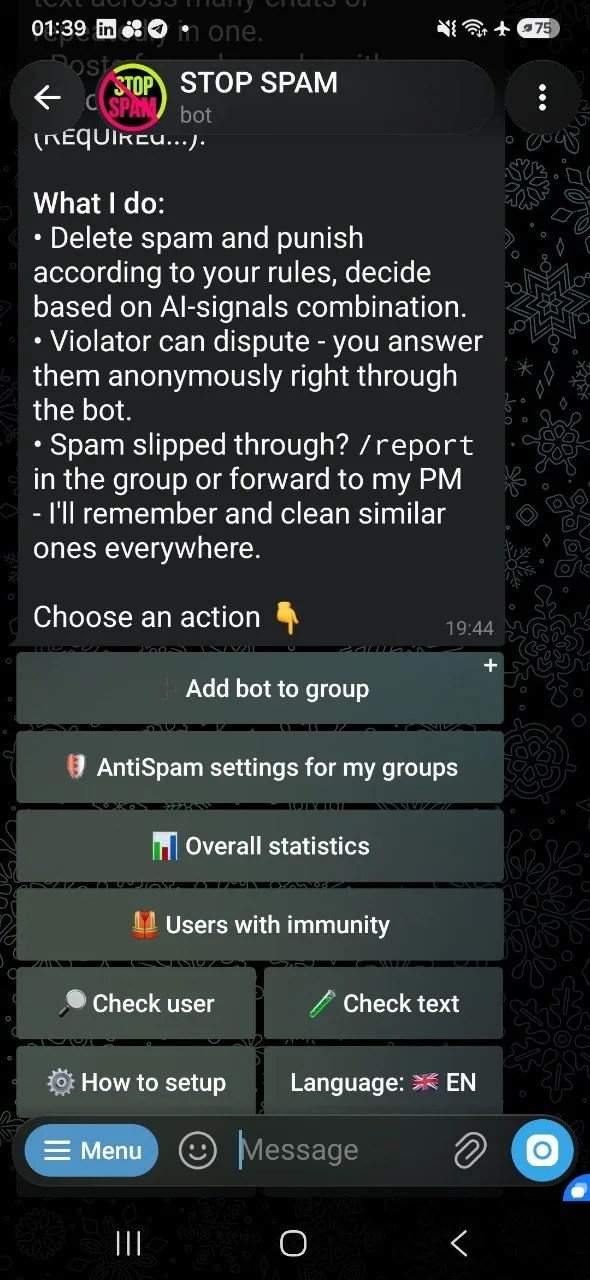
STOP SPAM main menu in English
Main menuChoose a group, open moderation tools and review the available settings
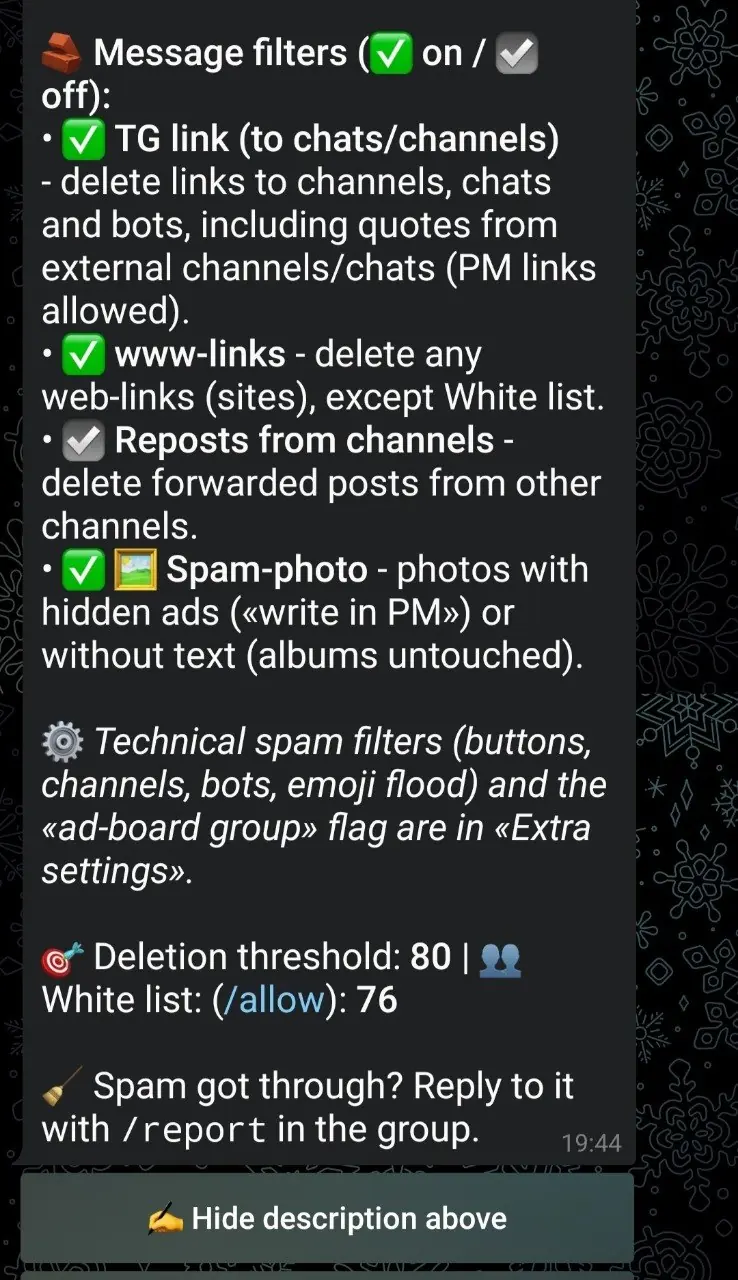
STOP SPAM message filters in English
Message filtersControl Telegram links, websites, reposts and image-spam handling
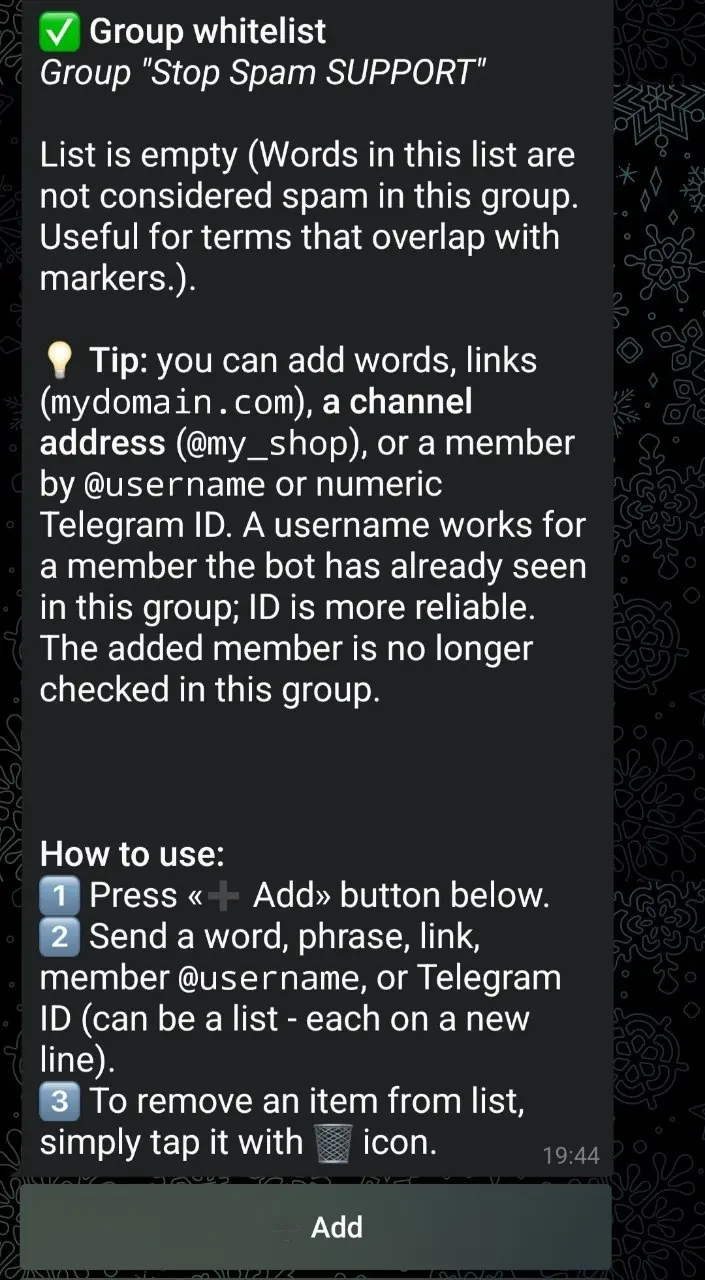
STOP SPAM local allowlist in English
Local allowlistTrust a member or bot in one group without weakening every managed chat
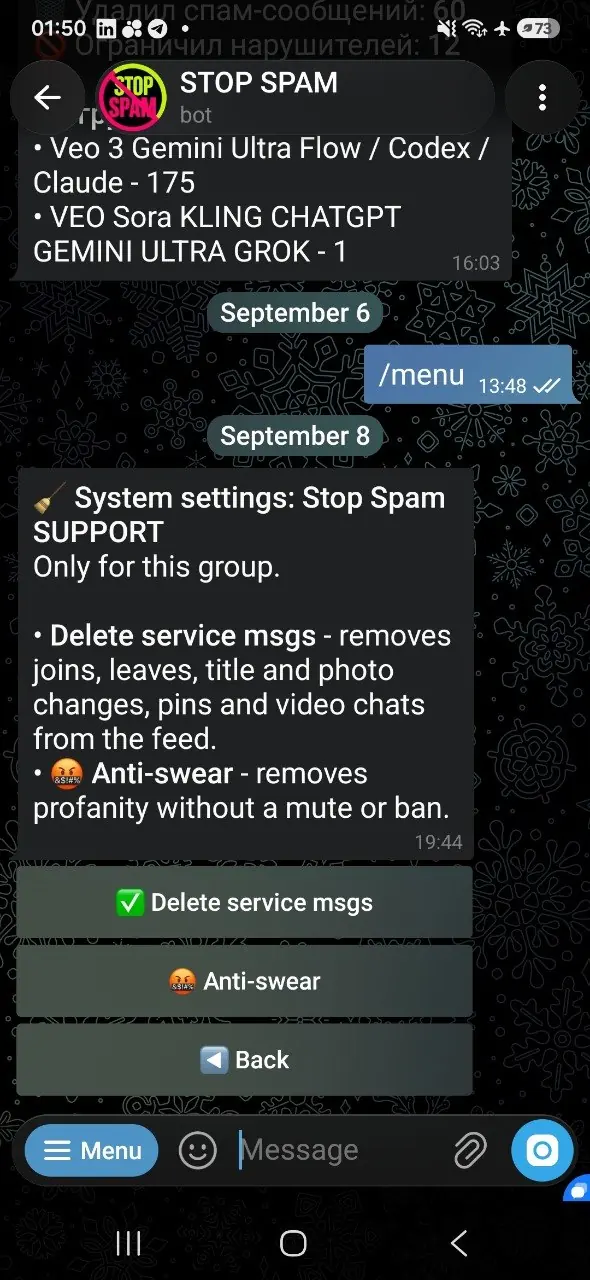
STOP SPAM profanity filter settings in English
Profanity filterRemove prohibited words under the group’s own settings
STOP SPAM Telegram link and repost filters in English
Telegram linksBlock unwanted channel, chat and bot links while preserving allowed destinations

Who benefits from an anti-spam bot for Telegram groups

The more active the chat, the more costly a false positive becomes

Classified and marketplace groups

These groups attract waves of “buying USDT for cash” and exchange promotions. A basic Telegram filter may remove them together with real sale listings. STOP SPAM evaluates combinations of signals and treats a phone number, city and price as possible signs of a genuine offer.

Local and neighbourhood chats

Community chats are often run by volunteers who cannot watch every message. The bot removes clear scams and private-message promotions around the clock, while uncertain cases go to an administrator for a human decision.

Job and side-work groups

Fraudulent recruitment often resembles a normal vacancy: “earn €200 a day” or “no experience or investment”. The detector distinguishes these patterns from genuine jobs that describe a schedule, duties and employer contact details.

24/7 spam protection

Protect your chat from spammers now

Setup takes about a minute. The bot starts working as soon as it is added.

This site uses no cookies, browser storage, advertising trackers or analytics trackers. Learn more