Telegram profanity filter: remove swear words without a ban
Need an anti-swear bot for a Telegram group? STOP SPAM deletes recognized profanity without mute, ban or SpamRating changes. You can customize the notice and auto-delete timing.
Updated September 9, 2026. Behavior matches the current bot settings and moderation flow.
What the filter does
When Anti-swear is enabled for a group, STOP SPAM checks regular member messages for recognized English, Russian, Ukrainian, Uzbek and Kazakh profanity. A matched message is deleted without creating an offense, changing SpamRating or starting the 1-hour, 24-hour and permanent mute ladder.
If the text independently contains strong scam or spam evidence, normal anti-spam rules still apply. Adding a swear word does not turn a scam message into a harmless profanity-only case.
The feature keeps the conversation clean without branding a member as a spammer for an emotional phrase.
How to enable Anti-swear
- 1
Select a group
Open “AntiSpam settings for my groups” in the bot and choose the required chat.
- 2
Open System settings
The profanity switch is separate from message-link and spam-content filters.
- 3
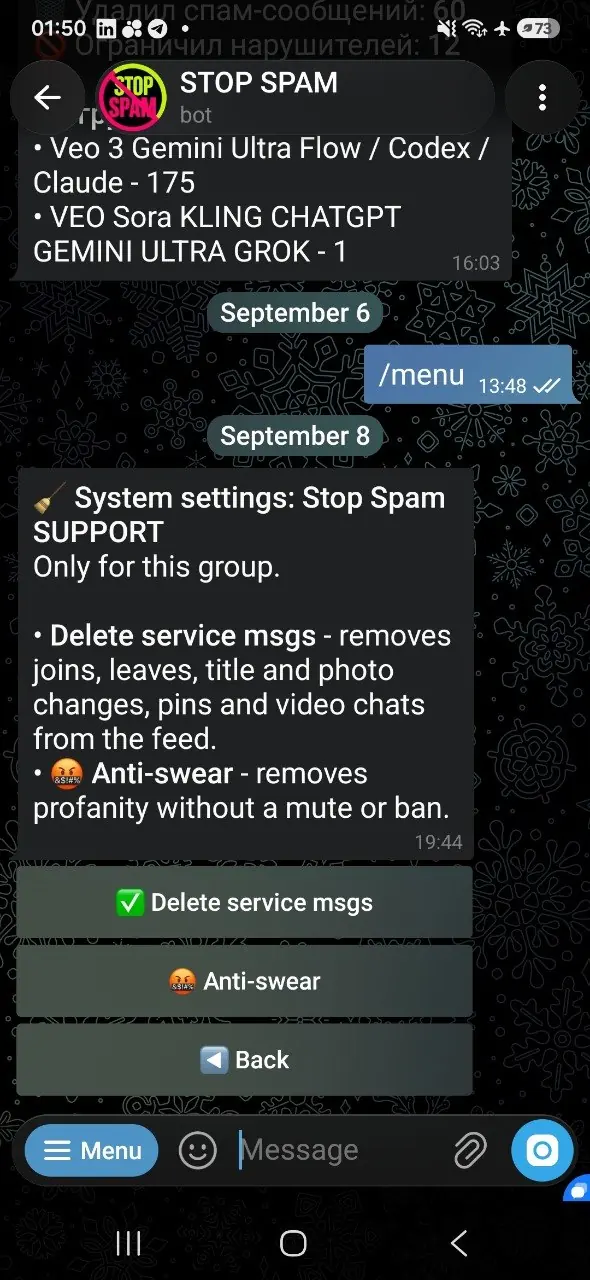
Turn on Anti-swear
The enabled state is shown with ✅. The setting can also be applied to all of your groups.
What members see
The bot may post a short reply explaining why the message was removed. An administrator can customize this notice and use the {user} placeholder for the member's name. The notice can disappear automatically after 20, 30, 60, 120 or 300 seconds.
Telegram does not allow a bot to restore a deleted message. If the filter made a mistake, disable or adjust the setting and ask the author to send the text again.
Who is excluded
- the group owner and active administrators;
- users in that group's allowlist or immunity scope;
- messages that do not match the supported profanity rules.
Limits of recognition
No dictionary recognizes every slang form, intentional obfuscation or regional expression. The filter reduces common profanity; it does not promise perfect language classification. Conservative matching helps avoid deleting normal words that merely contain a suspicious fragment.
Profanity filter FAQ
Will a deleted swear word increase SpamRating?
No. A profanity-only deletion does not create an anti-spam offense or train the spam database.
Can the notice disappear automatically?
Yes. Choose 20, 30, 60, 120 or 300 seconds, or disable the notice.
Can I enable it for every group at once?
Yes. System settings include bulk controls for groups managed through your account.
Does it replace the anti-spam detector?
No. Anti-swear is a separate hygiene filter; scam, spam and mass-mailing rules continue to work independently.
Keep the chat readable without over-punishing members
Enable the profanity filter alongside the main anti-spam protection.