Telegram chat member reputation
See who gets thanked for helping in your Telegram chat. STOP SPAM counts thanks and the different people who gave them. Only the person giving thanks sees the confirmation.
Updated October 15, 2026. Actual screenshot from a test group.
How to thank a member
- 1
Choose the person's message
Use Reply on a member's message in a group protected by STOP SPAM.
- 2
Write a short thank-you
For example: “thank you”, “спасибо тебе”, “дякую”, “rahmat” or “рақмет”. The bot recognizes thanks in English, Russian, Ukrainian, Uzbek and Kazakh regardless of the group's language.
- 3
Receive a private confirmation
The bot shows who you thanked, their total thanks and how many different members gave them. View message opens the original message; Got it closes the confirmation.
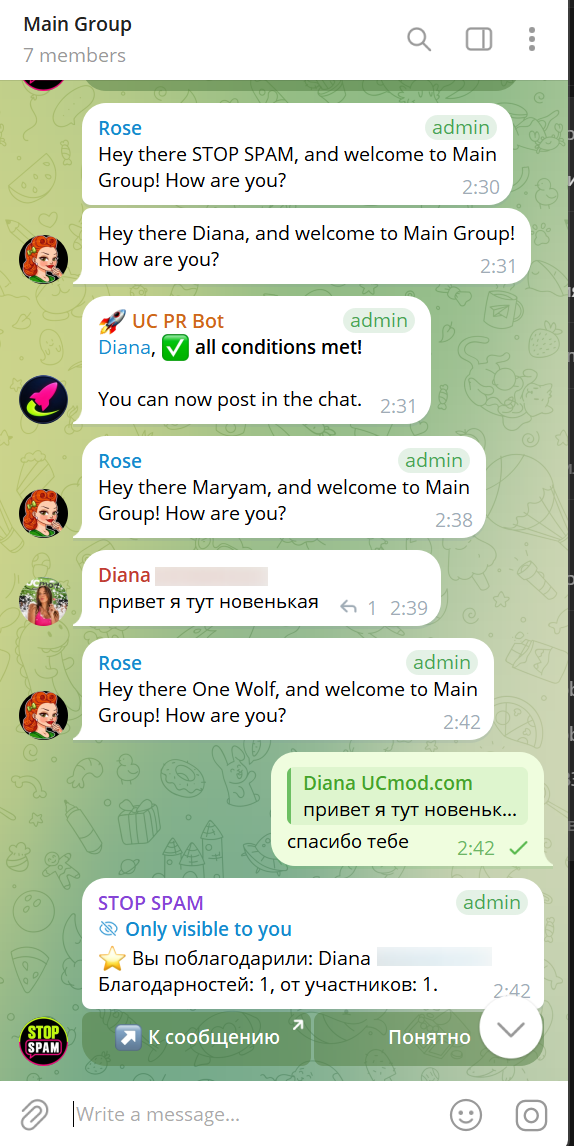
Who sees the notification
The confirmation appears inside the group only for the person giving thanks. The recipient gets no bot message in the group or in private. Other members see the ordinary thank-you message, but not the STOP SPAM confirmation.
This uses Telegram's private group responses. Delivery is not guaranteed if the user is offline. The bot never replaces a failed private confirmation with a public notice.
Where to see reputation
Open Check person in your private chat with @stopusdt_bot. Alongside the check result, the bot shows thanks received over the last 90 days and the number of different people who gave them. You can see your own thanks under How to setup → Thanks.
Thanks do not reduce SpamRating, lift a mute or ban, or add anyone to an allowlist.
How it helps moderation
Thanks from different established members with ordinary activity can help the bot treat a weak, uncertain signal more gently in the same group. Clear spam, spam databases, repeat checks and admin-enabled filters still apply. Reputation does not grant immunity from moderation.
Protection against inflated reputation
- One thank-you from you to the same person counts per 24 hours across all groups protected by the bot.
- Each member can give up to five counted thanks per 24 hours.
- Self-thanks, thanks to bots and forwarded messages do not qualify as personal help.
- Reciprocal thank-you chains do not make anti-spam checks more lenient.
- An edit that removes the thanks revokes the credit without restoring the daily quota.
How to hide notifications
From the second confirmation, a Don't show again button appears. It hides future confirmations for you across all groups protected by the bot. Thanks continue to count.
Restore notices in the private bot chat: How to setup → Thanks → Show notices. An administrator with the required permissions can hide confirmations for their group under group settings → Extra settings → Thanks. Counting continues.
See also: allowlists and lifting restrictions, admin and group languages.
Questions about reputation and thanks
Does the person receiving thanks get a notification?
No. Only the person giving thanks sees the STOP SPAM confirmation inside the group. The recipient gets nothing from the bot. The original thank-you remains an ordinary group message.
Can I hide confirmations?
Yes. The second confirmation includes a Don't show again button. Restore notices in the private bot chat under How to setup → Thanks. Thanks continue to count.
Do thanks clear a spam flag or a ban?
No. Thanks are separate from SpamRating. They do not lift restrictions or add anyone to an allowlist. Clear spam and group rules are still checked.
Let helpful replies earn thanks
Add STOP SPAM as an administrator with permission to delete messages and restrict members. Thanks are counted while group protection is active.