Telegram allowlist, “Not spam” and immunity
Allow a specific phrase or source, trust someone only in one group, grant immunity across your groups, or simply end a punishment. These scopes solve different problems and should not be treated as interchangeable buttons.
Updated September 9, 2026. Action scope matches the current cards, allowlists and spam-rating flow.
What the group allowlist accepts
The selected group's list can contain a word, phrase, link, domain, @username, Telegram ID or channel. Text and domains soften matching for legitimate ads; resolved user and channel IDs create a trusted exception in that group.
An allowed phrase is not a universal bypass. A known spam hash, confirmed mass distribution or persistent exact flood can still outweigh it. This prevents a spammer from inserting one popular allowed word to evade protection.
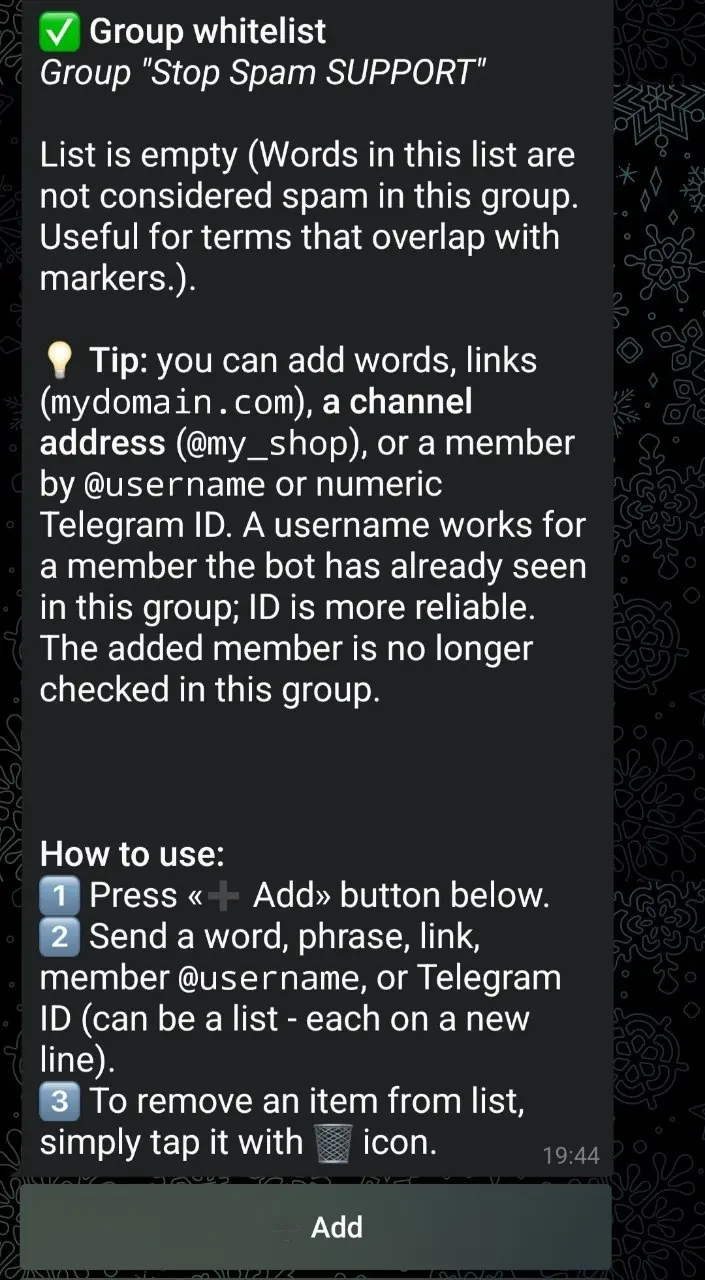
An administrator's decision in one community must not automatically open unrelated groups. Wider trust requires the separate Immunity action.
Can several admins manage restrictions?
Yes. In “Check user”, any current admin with permission to restrict members can select accessible groups to lift restrictions, mute/ban or change trust, regardless of who connected the bot. Permissions are checked again before acting; a group is skipped if verification fails. Bot settings, log-channel setup and service-management transfer remain with the connecting admin.
How do I check a forwarded message and its author?
Open “Check user” and forward a message: the author is checked, not its text. If Telegram hides the author's ID, tap “Choose a person” or send an ID/@username. We do not identify hidden authors by name. Forwarding in the main menu offers two separate actions: check the author or find and delete exact copies. Nothing happens before you choose; checking an author does not punish anyone or teach the spam database.
Actions in the “Check user” menu
1. “Not spam + trust” - allow in selected groups
This lifts mute/ban and adds trust only in selected groups. The shared rating, confirmed marks and spam samples remain. To reverse a specific message decision, use “Not spam” on that case card.
2. “Global immunity” - service owner only
This separate button applies across the network and requires the service owner's confirmation. Ordinary admins use “Not spam + trust in groups” to select accessible groups; their check card has no duplicate “Immunity” button.
3. “Lift restrictions” - remove mute/ban without trust
Mute/ban is lifted in selected groups without adding trust. An ordinary admin preserves the shared rating because old offences cannot be reliably separated by group. For the service owner, the rating resets once after at least one group is processed successfully. CAS/LOLS records, confirmed marks and spam samples remain and may cause another punishment.
How to add an exception in advance
- 1
Open the group
Select the group under “AntiSpam settings for my groups”.
- 2
Choose “White list”
Send one phrase, domain, link, username or Telegram ID per line.
- 3
Remove obsolete exceptions
Tap an item with the delete icon. Normal moderation starts applying again.
What cannot be restored
Telegram does not let a moderation bot recreate a deleted member message. After trust is granted and restrictions are lifted, the author must post it again. If Telegram rejects a permission change, the result card should report a partial outcome rather than claiming full restoration.
Allowlist and immunity FAQ
Which action should I use for one false positive?
Use “Not spam” when the decision should be reversed in the source group only.
Can I unmute someone without trusting all future posts?
Yes. “Lift restrictions” removes the punishment without adding allowlist access.
Does one allowed word disable anti-spam?
No. It reduces false-positive risk, but strong independent spam evidence and persistent repeats remain active.
Are active administrators already exempt?
Yes. STOP SPAM checks live Telegram administrator status rather than relying only on an old connection record.
Correct false positives without weakening the whole group
Apply the smallest trust scope that solves the actual problem.