How to take action against spam in your groups. Check the message author
Forward a message to the bot to check its author without punishment, or remove exact spam copies and restrict their authors in groups you can moderate.
Updated September 13, 2026. This guide follows the current forwarding handler and administrator checks.
What happens after you forward a message
Send the bot a forwarded text message or a forwarded post with a caption in a private chat. The action card remains available for 15 minutes. Closing it or taking no action does not make this forward delete messages, mute users or train on the text.

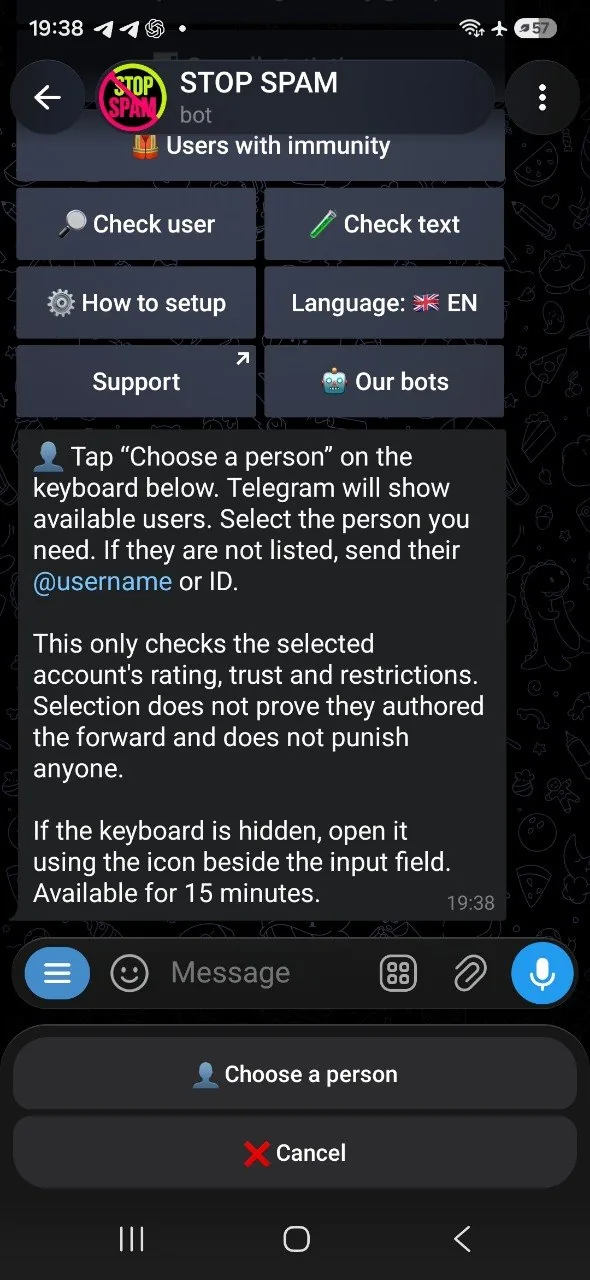
“Check author” or “Select a user”
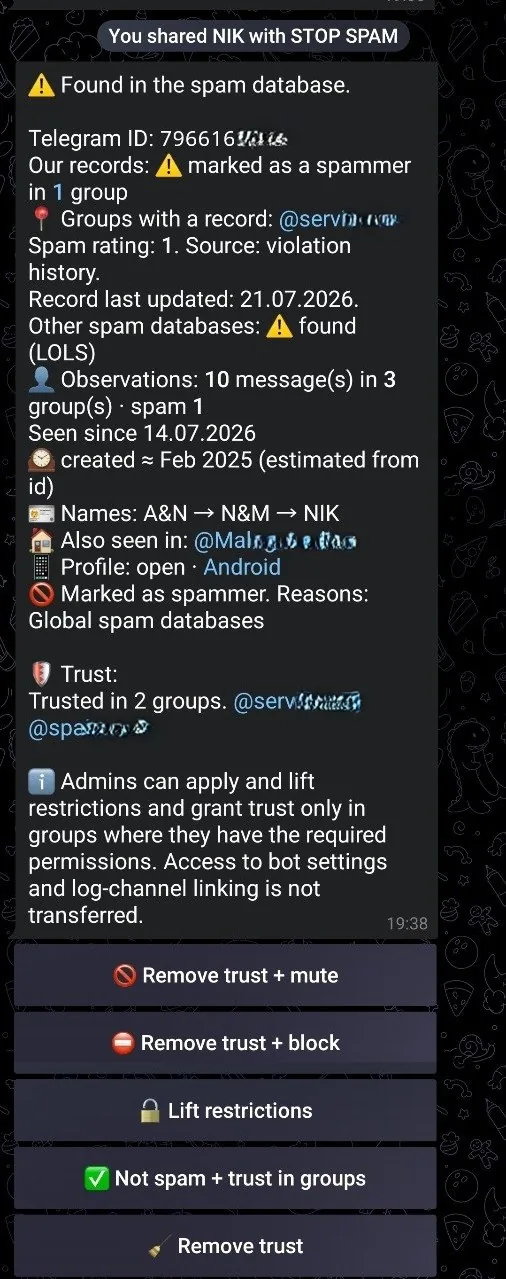
If Telegram includes the author's ID, STOP SPAM opens a profile card with the spam rating, trust and restrictions. This is an inspection, not punishment. If Telegram hides the ID for privacy, the bot offers Telegram's user-selection button; you may also enter an ID or @username. A displayed name alone does not reliably identify a person.
A selected account is only the lookup target, not a proven author of the forwarded text. Selection does not mark the account as spam, delete messages or change its reputation. Any later action from the profile card requires a separate decision and appropriate permissions.
How to take action against spam in Telegram: delete copies and mute
Forward the spam message to STOP SPAM privately and select “Find and delete copies”. The bot acts only in connected groups where you have moderation rights.
This choice has consequences. STOP SPAM remembers the forwarded text as spam, finds exact copies among available messages in connected groups, removes matches and permanently mutes the authors of copies actually removed. Only choose it when you are confident the text is spam. Altered or merely similar posts are not exact copies.
The service owner can act across connected groups. A regular administrator can act only in accessible connected groups where Telegram confirms their current rights. If those rights cannot be verified, the scope shrinks or the action cannot proceed. The result reports what was actually processed, not a promise to clean every group.
Here, an administrator manually forwards a suspicious post to the bot in private and chooses an action. The Telegram links and reposts filter automatically checks posts inside a group according to its settings. They are separate features.
A safe way to review a doubtful message
- 1
Forward it to STOP SPAM privately
Do not use only the sender's displayed name as proof of identity when the ID is hidden.
- 2
Inspect the person first
Check the rating, reasons, trust and restrictions. Viewing the card changes nothing.
- 3
Clean exact copies only when certain
This button saves a spam sample and can remove messages and restrict their authors in groups where you have rights.
If a manual decision turns out to be wrong, consult the allowlist and trust guide. Lifting a restriction, trusting a user in a group and reversing a particular false detection are different actions.
Forwarded-message FAQ
Will the bot delete anything as soon as I forward a post?
No. A forward to the private chat opens an action choice. Checking a person is read-only; removing copies is a separate button.
Can a hidden author be identified by their displayed name?
No. If Telegram hides the ID, the displayed name is not proof. You may select a user to inspect a profile, but that does not link the user to the forwarded text.
Will this clean similar posts from every group?
No. This action searches for exact copies within the connected groups accessible under current admin rights. The bot also needs its own moderation permissions to remove messages.
What if the choice card expires?
The choice is available for 15 minutes. Forward the message again to receive a fresh choice.
Review suspicious text without guessing who wrote it
Forwarding alone deletes nothing. The administrator decides what happens next.