Filter Telegram links, forwards and channel quotes
STOP SPAM separates two jobs: an intelligent filter for destinations inside Telegram and an optional rule for forwarded channel or chat posts. Personal profile links and normal user replies are not meant to disappear with spam.
Updated September 9, 2026. Wording matches the current filters, exclusions and escalation rules.
Two filters with different jobs
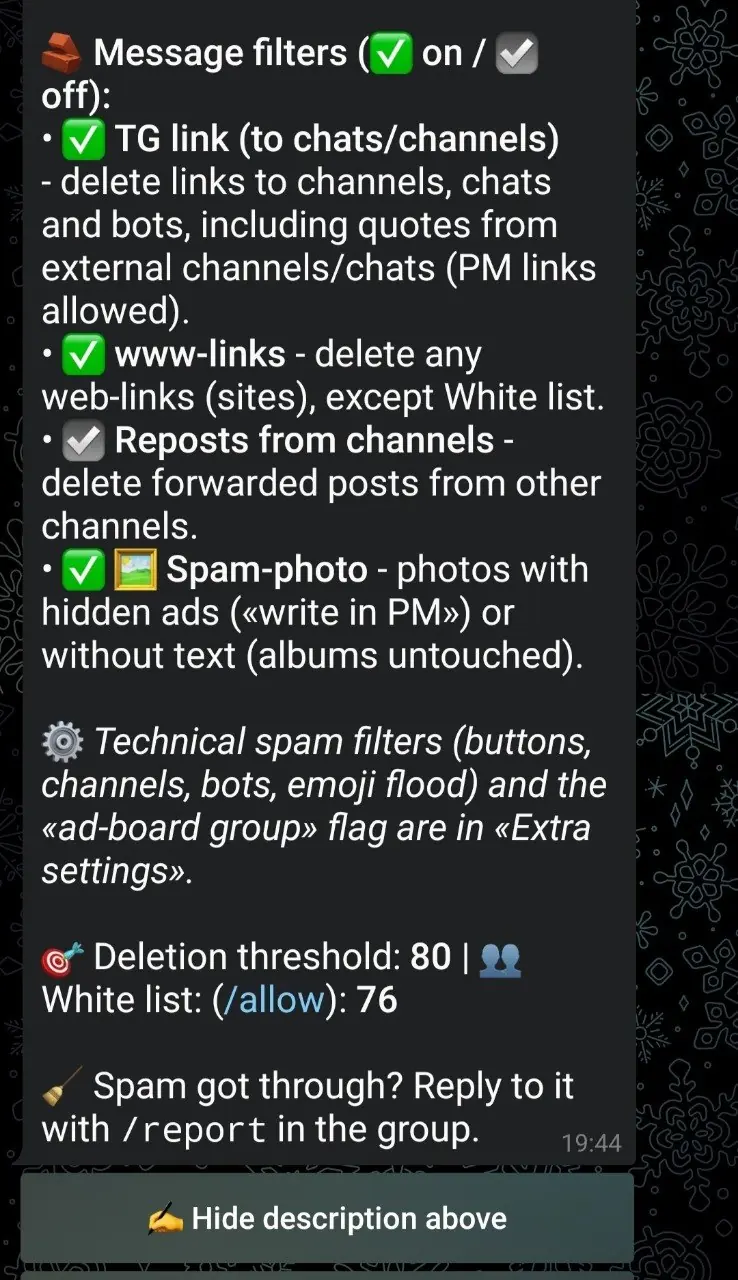
“TG link (to chats/channels)” recognizes public usernames, t.me addresses, invitation links, hidden hyperlinks, preview links and external quoted posts. It checks whether the destination is a channel, chat, bot or personal profile.
“Reposts from channels” separately removes forwarded publications from channels and chats. A group can allow original ads with personal contact links while still requiring members to write their own posts instead of forwarding a channel campaign.
Different communities have different publishing rules. Splitting them avoids an unnecessarily strict all-or-nothing setting.
How to enable protection
- 1
Select the group
Open “AntiSpam settings for my groups” in a private chat with @stopusdt_bot.
- 2
Enable “TG link”
The ✅ state filters recognized channels, chats, bots, invites and external quotes.
- 3
Decide whether forwards are allowed
Enable “Reposts from channels” only when forwarded channel and chat posts violate your rules.
What “TG link” removes
- links and mentions leading to a Telegram channel or chat;
t.me/+…andjoinchatinvitations;- links to third-party Telegram bots;
- Telegram links hidden behind ordinary words or in link previews;
- quotes from an external channel or chat even without a manually typed URL.
What it tries to leave alone
- a personal profile or username confirmed by Telegram as a regular user;
- STOP SPAM itself and current group administrators;
- quotes from the same group, its linked discussion channel or an explicitly allowed source;
- quotes and forwards from regular people;
- a destination that Telegram could not classify reliably.
What happens after a violation
A normal first channel link or external quote is removed without automatically labeling the author as a global spammer. Three removed Telegram links from one author in one group within six hours lead to a permanent mute in that group. A bot start or mini-app link, or an explicit t.me/+…/joinchat invite, may cause a permanent mute on the first removal.
Channel forwards follow a different rule: the second removed forward by the same author within 24 hours is counted across protected chats and starts the regular ladder - 1 hour, 24 hours, then permanent on later offenses.
Not the same as “www-links”
TG link is selective inside Telegram. The “www-links” setting removes any recognized website link except an allowed one. For ordinary classified groups, start with the intelligent Telegram filter and use the full web-link block only when the community rules prohibit all external sites.
Recognition limits
Private, deleted, misspelled or temporarily unavailable usernames may not resolve. STOP SPAM does not punish solely because Telegram failed to classify an address. Independent scam or mass-mailing evidence can still produce a stricter decision.
Telegram link filter FAQ
Will a personal username be blocked?
No when Telegram confirms it is a regular user. Channels, chats and bots are handled separately.
Why is a channel quote treated like a link?
Telegram provides a path back to the external source, so the quote can promote a channel without showing a URL.
Will a forwarded user message be deleted?
No. The channel-forward switch targets posts from channels and chats, not an ordinary person's forwarded message.
Do I need to enable www-links too?
No. It is a separate and much stricter filter for all web links.
Stop external channel promotion without banning personal contact links
Enable only the structural filters that match your Telegram group rules.